Category

Explainer Video

illustrated female character holding a coffee cup looking at monitor with text that says motion graphics explainer videos drive growth

Motion Graphics Explainer Videos for Business: The Ultimate Growth Tool

By | Explainer Video | No Comments

In today’s fast-moving digital world, businesses must grab attention quickly, or risk being ignored. That’s exactly why Motion Graphics Explainer Videos for business has become such an important topic in modern marketing strategy. From startups to global corporations, companies rely on these short, engaging videos to simplify ideas, boost brand awareness, and drive conversions.

Motion graphics explainer videos blend animation, text, sound, and storytelling into a powerful communication tool. They break down complex ideas into easy-to-understand visuals. And let’s be honest, people would rather watch a 60-second video than read a 2,000-word manual.

Let’s explore how businesses use this dynamic medium to grow smarter and faster.

1. Introduction to Motion Graphics Explainer Videos for Business

Motion graphics explainer videos are short animated clips designed to explain a product, service, or concept in a clear and engaging way. Unlike traditional videos, they don’t rely on actors or physical filming. Instead, they use animated graphics, typography, icons, and voiceovers.

These videos typically last between 60 and 120 seconds and focus on delivering one clear message.

What Are Motion Graphics?

Motion graphics are animated graphic design elements. They include:

  • Moving text
  • Animated logos
  • Infographics in motion
  • Character illustrations
  • Data visualization

They combine visual design with animation principles like timing, pacing, and movement to create engaging content.

What Makes an Explainer Video Effective?

A strong explainer video includes:

  • A clear problem-solution structure
  • Simple language
  • Engaging visuals
  • Professional voiceover
  • A compelling call to action

When these elements work together, the result is powerful and persuasive.

2. Why Motion Graphics Matter in Modern Marketing

We live in the “attention economy.” Consumers scroll quickly. If content doesn’t grab attention within seconds, it’s gone.

Video content performs better than text alone. According to data from Wyzowl, businesses consistently report higher engagement and improved ROI when using video marketing.

The Rise of Video Content

Video:

  • Increases user engagement
  • Improves information retention
  • Encourages social sharing
  • Boosts purchase decisions

Short-form visual content is now expected, not optional.

Psychological Impact of Visual Storytelling

Humans process visuals 60,000 times faster than text. Motion graphics combine:

  • Visual cues
  • Sound
  • Storytelling
  • Emotional triggers

This combination improves memory retention and builds emotional connections.

“89% of businesses use video as a marketing tool”

Wyzwol

3. How Businesses Use Motion Graphics Explainer Videos for Brand Awareness

Brand awareness is often the first step in the marketing funnel. Motion graphics make brands memorable.

Building a Memorable Brand Identity

Animated logos, consistent color schemes, and brand typography help create recognition. Businesses use explainer videos to:

  • Introduce their mission
  • Showcase brand personality
  • Highlight unique selling points

Consistency across videos strengthens brand authority.

Social Media Amplification

Motion graphics are highly shareable. They perform well on:

  • Instagram
  • LinkedIn
  • Facebook
  • YouTube
  • TikTok

Short animated videos increase reach and encourage engagement.

4. Driving Conversions with Explainer Videos

One of the most powerful reasons businesses invest in motion graphics is conversion growth.

Simplifying Complex Products

Industries like SaaS, fintech, and healthcare often struggle to explain complicated services. Motion graphics break down:

  • Technical features
  • Data systems
  • Processes
  • Benefits

This clarity reduces confusion and increases trust.

Call-to-Action Optimization

Strong explainer videos end with a clear CTA, such as:

  • Sign up now
  • Book a demo
  • Start your free trial
  • Contact us today

A well-placed CTA increases click-through rates and conversions.

“87% of consumers were convinced to buy a product or service after watching a video.”

Wyzowl

Get a Quick Estimate For Your Explainer Video!

Get a personalized estimate now and start creating explainer videos that drive engagement and sales.

5. Enhancing Customer Education and Onboarding

After a customer signs up, education becomes critical.

Reducing Support Costs

Businesses use explainer videos in:

  • Help centers
  • FAQ pages
  • Product tutorials

This reduces repetitive support tickets and improves efficiency.

Improving User Retention

When customers understand how to use a product, they’re more likely to stay. Clear video guidance increases satisfaction and long-term loyalty.

6. Internal Communication and Training Applications

Motion graphics aren’t just for customers. They’re powerful internal tools too.

Employee Onboarding

Companies use animated videos to:

  • Introduce company culture
  • Explain policies
  • Outline expectations

New hires absorb information more quickly through visuals.

Compliance Training

Legal and compliance topics can feel overwhelming. Animated videos simplify complex regulations and make learning less intimidating.

7. SEO Benefits of Motion Graphics Explainer Videos for Business

seo benefits of motion graphics explainer videos

Video supports search engine optimization in several ways.

Video and SERP Rankings

Google often displays video results prominently. Hosting videos on YouTube (the second largest search engine) improves discoverability.

Embedding videos on websites also increases time on page—an important ranking factor.

Website Engagement Metrics

Motion graphics help:

  • Lower bounce rates
  • Increase dwell time
  • Boost interaction

Search engines interpret these behaviors as positive user signals.

8. Cost-Effectiveness Compared to Live-Action

Live-action videos require actors, locations, equipment, and large crews. Motion graphics eliminate many of these costs. Learn more about Motion Graphics Explainer Video Cost in 2026.

Scalability

Once design assets are created, businesses can:

  • Repurpose content
  • Create variations
  • Translate into other languages

This makes motion graphics highly scalable.

Long-Term ROI

Explainer videos remain useful for years. They can be used in:

  • Email campaigns
  • Paid ads
  • Landing pages
  • Trade shows
  • Investor presentations

One well-made video delivers ongoing returns.

9. Industry-Specific Use Cases

Different industries use motion graphics differently.

B2B Applications

In B2B marketing, explainer videos:

  • Clarify enterprise solutions
  • Support lead nurturing
  • Shorten sales cycles

Sales teams often use them during presentations.

E-commerce Applications

Retail brands use animated videos to:

  • Showcase product benefits
  • Explain usage
  • Highlight promotions

Short animations increase purchase confidence.

10. Measuring Success and Performance Metrics
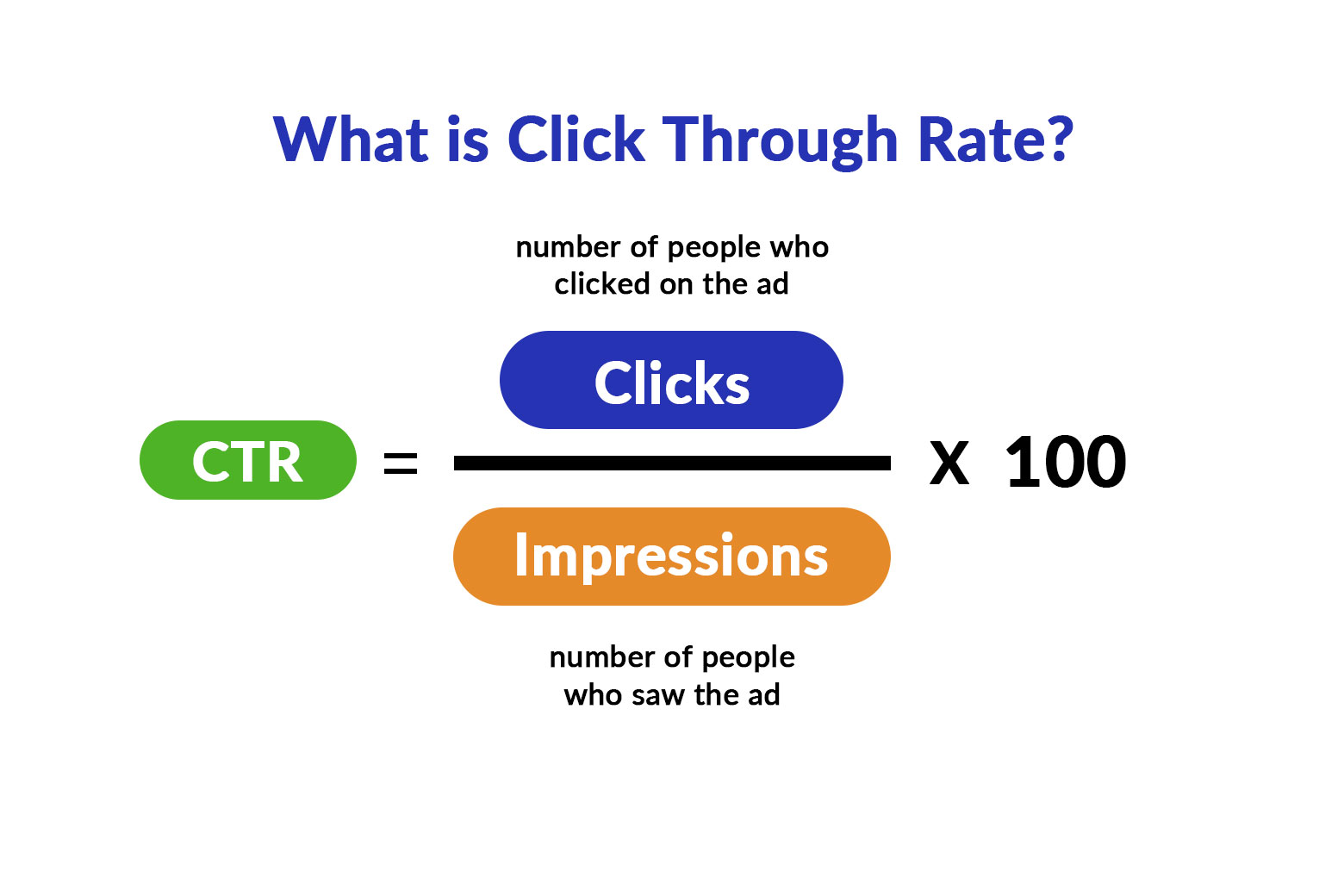
click through rate for video algorithm

To maximize impact, businesses track performance carefully.

Engagement Metrics

Key metrics include:

  • Watch time
  • Completion rate
  • Shares
  • Likes and comments

High engagement indicates strong audience interest.

Conversion Metrics

Businesses also measure:

  • Click-through rate (CTR)
  • Lead generation
  • Sales conversions
  • Customer acquisition cost

These numbers show real ROI.

Find Out How Much Your Explainer Video Will Cost!

Get a personalized estimate now and start creating explainer videos that drive engagement and sales.

Frequently Asked Questions

1. How long should a motion graphics explainer video be?

Most effective videos range between 60 and 120 seconds. Shorter is often better.

2. Are motion graphics better than live-action videos?

It depends on the goal. Motion graphics are ideal for explaining complex ideas, while live-action works well for emotional storytelling.

3. Do explainer videos improve SEO?

Yes. They increase time on page, engagement, and visibility in search results.

4. How much does a professional explainer video cost?

Costs vary widely depending on complexity, length, and production quality.

5. Can small businesses benefit from motion graphics?

Absolutely. Even startups use animated explainers to build credibility quickly.

6. Where should businesses place explainer videos?

Common placements include homepages, landing pages, email campaigns, social media, and sales presentations.

Conclusion

In a world overflowing with information, clarity wins. Motion graphics explainer videos for business offer a powerful way to communicate clearly, quickly, and creatively. From boosting brand awareness to increasing conversions and improving customer education, the strategic value is undeniable.

Companies that invest in high-quality animation and storytelling don’t just inform, they inspire action.

As digital competition grows, businesses that embrace visual communication will stay ahead. Motion graphics are no longer a luxury. They’re a strategic necessity.
animated characters discussing motion graphics explainer video cost for u.s. based company

Motion Graphics Explainer Video Cost in the U.S.: 2026 Pricing Breakdown

By | Explainer Video | No Comments

What Is a Motion Graphics Explainer Video?

Definition and Purpose

A motion graphics explainer video is a short, animated video that uses graphic elements, text, icons, and smooth transitions to explain a product, service, or idea clearly and quickly. Unlike character-based animation, motion graphics focus more on visuals, typography, and movement.

In the United States, companies rely on these videos to simplify complex messages, boost conversions, and strengthen brand identity.

Why U.S. Businesses Use Motion Graphics

American audiences value speed, clarity, and professionalism. Motion graphics explainer videos are popular because they:

  • Increase landing page conversion rates
  • Improve customer understanding
  • Enhance brand credibility
  • Work well across websites, ads, and social media

Because of these benefits, understanding the motion graphics explainer video cost becomes a critical budgeting decision.


Average Motion Graphics Explainer Video Cost in the United States

Entry-Level Pricing

For startups and small businesses, entry-level motion graphics explainer videos typically cost:

  • $1,000 – $2,500
  • Length: 30–60 seconds
  • Simple visuals and templates
  • Limited revisions

These videos are affordable but may lack customization and advanced animation.

Mid-Range Professional Pricing

Most U.S. businesses choose mid-range production for better quality and branding.

  • $2,500 – $5,000
  • Custom illustrations
  • Professional scriptwriting
  • Licensed voiceover
  • Smooth transitions and effects

This pricing range offers the best balance between quality and affordability.

High-End / Enterprise Pricing

Large corporations and funded startups often invest in premium videos.

  • $5,000 – $10,000+
  • Highly customized motion design
  • Advanced animation techniques
  • Strategic messaging
  • Multiple versions for ads and platforms

At this level, the motion graphics explainer video cost reflects strategic marketing value rather than just visuals.

Get a Quick Estimate For Your Explainer Video!

Get a personalized estimate now and start creating explainer videos that drive engagement and sales.


Factors That Influence Motion Graphics Explainer Video Cost

Video Length

Longer videos require more design, animation, and rendering time.

  • 30 seconds: lowest cost
  • 60–90 seconds: standard pricing
  • 2+ minutes: premium pricing

Scriptwriting and Storyboarding

Professional scripts improve clarity and conversions. U.S.-based scriptwriting can add $100–$500 to the total cost.

Design Complexity

Simple icons cost less, while detailed illustrations and branded elements increase the budget significantly.

Animation Style

Flat motion graphics, whiteboard, or kinetic typography are cheaper than 3D animation or layered 2.5D animation.

Voiceover and Sound Design

U.S. voiceover artists typically charge:

  • $100–$500 for professional narration
  • Additional cost for background music licensing

U.S. Based vs Overseas Studios: Cost Comparison

Many U.S. companies exploring ways to reduce motion graphics explainer video cost consider hiring overseas freelancers or animation studios. Countries such as Indonesia, the Philippines, Ukraine, and parts of Eastern Europe are popular outsourcing destinations due to significantly lower production costs. However, pricing is only one part of the equation.

Average Overseas Motion Graphics Explainer Video Pricing

Compared to U.S.-based providers, overseas options are often 40%–70% cheaper, depending on quality and experience:

  • Experienced Overseas Studios:
    • $1,500 – $5,000 per video
  • U.S. Based Studios:
    • $5,000 – $10,000+ per video

At first glance, these numbers make overseas production appealing, especially for startups or early-stage companies with limited budgets.

Here is an example motion graphics explainer video created by us (Eggplain), an overseas studio based in Indonesia with 10+ years of experience.

Why Overseas Pricing Is Lower

Lower motion graphics explainer video cost overseas is mainly due to:

  • Lower cost of living and labor
  • Favorable currency exchange rates
  • High competition in global freelance marketplaces
  • Full-online communication

These factors allow overseas providers to offer aggressive pricing that U.S. studios typically cannot match.

Communication Considerations

While cost savings are attractive, U.S. businesses should weigh several important factors:

  • Communication & Time Zones:
    Delays may occur due to time differences, slowing feedback and revisions.
  • Cultural and Market Understanding:
    Inexperienced overseas studios may lack familiarity with U.S. consumer behavior, tone, and compliance standards.

Hidden Costs You Should Know About

Many U.S. businesses overlook:

  • Extra revisions
  • Source file ownership
  • Multiple aspect ratios
  • Rush delivery fees

Always clarify these before finalizing your budget.


ROI: Is the Cost Worth It for U.S. Businesses?

Yes, when done right. According to Wyzowl, video can increase conversion rates by over 80% when placed on landing pages .

A single high-performing explainer video can outperform multiple ads, making the investment worthwhile.

“Explainer video increase conversion rates by over 80%”

Wyzowl

Find Out How Much Your Explainer Video Will Cost!

Get a personalized estimate now and start creating explainer videos that drive engagement and sales.


FAQs About Motion Graphics Explainer Video Cost

1. What is the average motion graphics explainer video cost in the U.S.?

Most U.S. businesses pay between $2,000 and $8,000 for a professional-quality video.

2. Why are U.S. explainer videos more expensive than overseas options?

Higher labor costs, strategic input, and quality standards increase pricing.

3. How long does production take?

Typically 3–8 weeks, depending on complexity.

4. Can I update the video later?

Yes, but revisions or updates may incur additional costs.

5. Is a voiceover mandatory?

No, but voiceovers significantly improve engagement and clarity.

6. Are motion graphics better than live-action explainers?

For complex topics, motion graphics often deliver better clarity at a lower cost.


Conclusion: Final Thoughts on Motion Graphics Explainer Video Cost

The motion graphics explainer video cost in the United States varies widely, but most businesses should expect to invest between $2,000 and $8,000 for a high-quality result. While cheaper options exist, professional production delivers stronger branding, higher engagement, and better long-term ROI.

If your goal is clarity, credibility, and conversions, a well-produced motion graphics explainer video is worth every dollar.

Boost Your Business Growth with Motion Graphics Explainer Videos

Boost Your Business Growth with Motion Graphics Explainer Video!

By | Explainer Video | No Comments

Motion Graphics Explainer Video for Business

A motion graphics explainer video for business is one of the most powerful tools companies use today to communicate their message quickly, clearly, and creatively. With attention spans shrinking and digital competition rising, businesses need a simple yet engaging way to explain their products, services, or ideas — and motion graphics offer exactly that. In today’s digital marketplace, brands that use video storytelling gain a major competitive edge.

97% of businesses believe explainer videos help users understand their business more effectively.

MotionPlay

What Is a Motion Graphics Explainer Video?

Definition and Core Purpose

A motion graphics explainer video blends animated graphics, text, symbols, icons, and smooth transitions to explain a concept in a visually engaging way. It’s designed to turn complex ideas into easy-to-understand visuals that hold attention and encourage viewers to take action.

Why Motion Graphics Stand Out Compared to Traditional Video Styles

Benefits of using motion graphics explainer video outperform traditional live-action videos because they’re flexible, cost-effective, and perfect for breaking down technical or abstract topics. They also adapt well to corporate branding, making them ideal for business communication.

Why Your Business Needs a Motion Graphics Explainer Video (3Cs)

Communicating Complex Ideas Quickly

Explainer videos simplify complicated processes or technical information with clean visuals and smooth transitions.

Capturing Customer Attention

Motion graphics are colorful, modern, and fast-paced — perfect for grabbing attention in under three seconds.

Conversion Rates Increase

Studies show that placing a motion graphics video on a landing page can increase conversions significantly. Viewers better understand your offer, meaning they’re more likely to take action.

Get a Quick Estimate For Your Explainer Video!

Get a personalized estimate now and start creating explainer videos that drive engagement and sales.


Key Benefits of Using a Motion Graphics Explainer Video for Business

  • Enhancing Brand Identity: With consistent colors, fonts, and visual cues, motion graphics strengthen brand recognition.
  • Improving Website Engagement Metrics: Videos increase time-on-page, lower bounce rates, and keep visitors engaged longer.
  • Boosting Social Media Visibility: Social platforms prioritize video content, giving motion graphics a natural algorithm advantage.

Strategies to Use Your Motion Graphics Explainer Video Effectively

  • Adding the Video to Your Website Homepage: Your homepage is the perfect place to showcase an explainer video to instantly communicate value.
  • Using It in Email Marketing Campaigns: Videos can increase click-through rates by encouraging user engagement.
  • Leveraging Social Media Platforms: Short clips can be posted across Instagram, LinkedIn, Facebook, and TikTok to boost visibility.

Tips for Creating a High-Quality Motion Graphics Explainer Video

  • Strong Scripting and Storytelling: Write with clarity and keep the message concise.
  • Clear Branding and Color Consistency: Use consistent visuals to strengthen brand recall.
  • Professional Voiceover and Sound Effects: High-quality audio dramatically enhances viewer experience.


How Much Does a Motion Graphics Explainer Video Cost?

Explainer video costs vary based on script length, animation complexity, voiceover quality, and revision cycles. Businesses on a budget can choose simplified visual styles or shorter video lengths.

Real-World Examples of Motion Graphics Success

A small software company hired us to create a short video for their homepage. This 30-sec motion graphics explainer video cost $750, and took 3-4 weeks to produced.

A multi-national SaaS company asked us to simplified their onboarding process using a motion graphics explainer video. Their motion graphics explainer video took 5-6 weeks to create, and cost $1,200.

Find Out How Much Your Explainer Video Will Cost!

Get a personalized estimate now and start creating explainer videos that drive engagement and sales.


FAQs About Motion Graphics Explainer Video for Business

1. What is the ideal length for a motion graphics explainer video?
30–90 seconds is recommended for maximum engagement.

2. How long does production take?
Typically 3–6 weeks, depending on complexity.

3. Can motion graphics include real footage?
Yes, hybrid videos combine animation and live-action clips.

4. Is motion graphics suitable for all industries?
Absolutely — from healthcare to finance to tech, motion graphics fit all niches.

5. Do motion graphics explainer videos help SEO?
Yes, videos improve engagement signals, which boosts SEO.

6. Where should I upload my explainer video?
Post it on YouTube, your homepage, landing pages, social media, and email campaigns.

Conclusion

A motion graphics explainer video for business is an essential tool for modern brands looking to communicate clearly, attract attention, and boost conversions. Whether you want to simplify a complex idea or enhance brand storytelling, motion graphics offer an affordable, visually stunning solution.

How to Make a Motion Graphics Explainer Video Step-by-Step Guide

How to Make a Motion Graphics Explainer Video: Step-by-Step Guide

By | Explainer Video | No Comments

Introduction to Motion Graphics Explainer Videos

Motion graphics explainer videos have become one of the most powerful tools for businesses, educators, and content creators. They combine animation, text, and sound to communicate complex ideas in a simple and engaging way. In today’s fast-paced digital world, audiences prefer short, visually rich videos that get to the point quickly—and that’s exactly where motion graphics shine.

“91% of businesses use video as a marketing tool.”

Wyzowl

What Are Motion Graphics Explainer Videos?

Motion graphics explainer videos use animated visuals to break down a product, service, or concept. Unlike traditional videos with actors or static presentations, motion graphics rely on animated text, shapes, and icons to illustrate ideas. They’re clean, modern, and visually appealing—making them perfect for explaining tech products, educational content, and marketing campaigns.

Why Businesses and Creators Use Motion Graphics Explainer Videos

Brands use these videos because they make information digestible, entertaining, and memorable. Whether it’s a product demo or a company introduction, motion graphics help audiences quickly understand what’s being offered. Moreover, they enhance brand identity through consistent colors, typography, and motion style.

Benefits of Motion Graphics Explainer Videos

Boosting Engagement and Brand Recall

Motion graphics videos grab attention instantly. Their vibrant visuals and dynamic motion keep viewers watching longer, improving engagement rates and brand recall.

Simplifying Complex Ideas Through Visuals

A key advantage is simplification. By turning complex topics into visual metaphors, you help audiences grasp information faster—especially useful in industries like tech, healthcare, or finance.

Enhancing Conversion Rates with Storytelling

Storytelling through motion graphics connects emotionally with viewers. A well-structured explainer video can increase conversion rates by 20–30%, as it guides the viewer through a clear and persuasive message.

Get a Quick Estimate For Your Explainer Video!

Get a personalized estimate now and start creating explainer videos that drive engagement and sales.


1. Planning Your Motion Graphics Explainer Video

Defining the Goal and Target Audience

Every great video starts with a clear purpose. Are you trying to educate, sell, or inspire? Define your goal and identify who your target audience is—their age, interests, and pain points.

Writing a Compelling Script

A motion graphics explainer video is only as strong as its script. Keep it short (60–90 seconds), conversational, and focused on the problem, the solution, and the call-to-action (CTA).

Creating a Storyboard to Visualize the Flow

Before animating, sketch out the scenes. A storyboard helps map the sequence of visuals, text, and narration, ensuring smooth transitions and logical flow.

2. Designing the Visual Elements

Choosing the Right Color Palette and Typography

Colors and fonts convey mood and personality. Stick to 2–3 brand colors and use readable fonts that align with your brand identity.

Creating Characters and Icons for Motion Graphics

Custom icons or characters make your video unique. Use shapes and simple designs for clarity—avoid clutter that distracts from the message.

Using Brand Elements Consistently

Maintain visual consistency with your brand’s logo, colors, and typography to strengthen recognition.

3. Animation Techniques for Explainer Videos

Keyframe Animation and Motion Design Principles

Mastering keyframes is essential. Smooth acceleration, deceleration, and easing effects make animations look professional rather than robotic.

Smooth Transitions and Timing Tricks

Perfect timing creates flow. Sync movement to voiceovers and maintain a rhythm that feels natural.

Syncing Motion with Voiceovers and Music

Good sound design enhances storytelling. Ensure that each motion or scene change matches the beats or cues in the audio track.

4. Tools and Software for Making Motion Graphics Explainer Videos

Beginner-Friendly Tools (Canva, Animaker, Vyond)

If you’re new to animation, tools like Canva, Animaker, and Vyond offer drag-and-drop templates for quick results.

Professional Tools (After Effects, Blender, Cinema 4D)

For advanced designers, Adobe After Effects remains the gold standard. Blender and Cinema 4D are also powerful for 3D motion graphics.

Audio Editing and Sound Design Tools

Use software like Audacity, Adobe Audition, or GarageBand to record, clean, and enhance your audio.

5. Producing Your Motion Graphics Explainer Video

Now that your storyboard, visuals, and assets are ready, it’s time to bring your project to life. Production is where all the pieces — script, animation, and sound — come together seamlessly.

Recording Voiceovers and Background Music

A high-quality voiceover is the backbone of any good explainer video. Choose a tone that fits your brand — friendly, professional, or conversational. You can record voiceovers using tools like Audacity or Adobe Audition with a good-quality microphone.

For background music, opt for royalty-free tracks that complement the mood of your video. Avoid overpowering music; it should support the visuals, not dominate them. Sites like Epidemic Sound, Artlist, or Free Music Archive offer a range of tracks perfect for explainer videos.

Editing and Polishing the Final Video

Editing is where the magic happens. Combine your animations, transitions, and audio to create a cohesive flow. Fine-tune the pacing — not too slow, not too fast. Review the video multiple times to ensure every frame aligns with the narration.

Don’t forget to add subtitles for accessibility. Subtitles not only make your video more inclusive but also improve engagement on social platforms where videos autoplay without sound.

Exporting in the Right Format and Resolution

Once your edit is complete, export the video in the correct format. The most common format for web use is MP4 (H.264). Choose a resolution of 1080p or 4K for high-quality visuals. Keep file size optimized for faster loading without losing clarity.

6. Promoting and Sharing Your Explainer Video

Even the most well-made video won’t make an impact if no one sees it. Promotion is the key to ensuring your motion graphics explainer video reaches the right audience.

Uploading on YouTube and Social Media Platforms

Start by uploading your video on YouTube, the second-largest search engine in the world. Optimize the title, description, and tags with your keyword — for example, “how to make a motion graphics explainer video”.

Share snippets or teaser clips on Instagram, LinkedIn, TikTok, and Facebook to attract attention and drive traffic back to the full video.

Embedding on Websites and Landing Pages

Adding your video to your website or landing page can increase conversion rates significantly. Studies show that including an explainer video can boost conversions by up to 80%. Use autoplay or a thumbnail that invites users to click play.

Measuring Engagement and Performance Metrics

Track your video’s success using analytics tools. Measure views, watch time, click-through rates, and engagement metrics. Platforms like YouTube Analytics and Google Analytics offer insights into how well your video performs and where improvements are needed.

Optimizing Videos for SEO and Accessibility

Optimize your video file name, title, and metadata using keywords. Provide captions and transcripts for accessibility. Hosting your video on YouTube and embedding it on your website increases visibility and ranking potential.

“Landing pages with videos increase conversions by up to 86%.”

VWO


When to Hire a Professional Motion Designer Instead of DIY

Creating your own explainer video can be a fun and rewarding challenge, but sometimes, hiring a professional studio or motion designer is the smarter choice — especially if you want a high-quality, brand-aligned, and conversion-focused video.

Professional motion graphics artists bring a combination of creative vision, technical skill, and storytelling expertise that’s difficult to replicate without experience. Let’s explore the reasons why investing in professional help can pay off in the long run.

You should consider hiring a professional when:

  • You need a video for a high-stakes campaign or product launch.
  • You want custom animations beyond what templates can offer.
  • You require voiceover integration, advanced 3D motion, or special effects.
  • You value speed, quality, and consistency over experimentation.

For startups or small businesses with limited budgets, starting with DIY tools makes sense. But as your brand grows, upgrading to professional-grade motion graphics can dramatically improve your visual storytelling and marketing results.

Find Out How Much Your Explainer Video Will Cost!

Get a personalized estimate now and start creating explainer videos that drive engagement and sales.


FAQs About Making Motion Graphics Explainer Videos

1. What is the ideal length for a motion graphics explainer video?
The best-performing explainer videos are between 60 and 90 seconds long. This duration keeps the viewer’s attention while delivering your key message effectively.

2. Do I need professional software to make an explainer video?
Not necessarily. Beginners can use tools like Canva, Animaker, or Powtoon. Professionals often prefer Adobe After Effects for greater creative control.

3. How long does it take to create a motion graphics explainer video?
Depending on complexity, it can take anywhere from 3 days to 3 weeks — including scripting, designing, animating, and editing.

4. Can I make an explainer video without voiceovers?
Yes, but it’s not ideal. Voiceovers enhance storytelling and make the message clearer. If you skip it, use strong visuals and on-screen text instead.

5. How much does it cost to make a motion graphics explainer video?
DIY videos can cost as little as $50-$200 (using templates), while professional productions can range from $500 to $2,500+, depending on quality and length.

6. What’s the difference between motion graphics and animation?
Motion graphics focus on moving shapes and text to convey ideas, while animation often involves character movement and storytelling. Motion graphics are typically used for informative and marketing content.


Conclusion: Bringing Your Story to Life Through Motion Graphics

Learning how to make a motion graphics explainer video opens doors to creative storytelling and brand communication. Whether you’re a small business owner, educator, or digital marketer, these videos can turn complex ideas into engaging stories that inspire action.

By combining compelling scripts, clean design, smooth animation, and strong sound design, you can craft an explainer video that resonates with your audience — driving both engagement and conversions.

So, start small, experiment, and keep refining your style. Every frame you animate brings your story one step closer to life!

Best Motion Graphics Explainer Videos for SaaS Products

Best Motion Graphics Explainer Videos for SaaS Products

By | Explainer Video | No Comments

What is a SaaS Motion Graphics Explainer Video?

Defining SaaS Explainer Videos

A SaaS motion graphics explainer video is a short animated video designed to simplify complex software concepts for audiences. Since SaaS products often deal with abstract, intangible solutions like cloud storage, automation, or AI-driven tools, motion graphics help visualize these services in an engaging, digestible way.

Instead of relying on lengthy text-based explanations or static product demos, explainer videos use a combination of animation, narration, and storytelling to clarify how a product works and why it matters.

Why Motion Graphics are Perfect for SaaS Companies

For SaaS specifically, explainer videos yield 3× higher conversion rates and 170% more engagement on product pages.

MotionPlay

Unlike physical products, SaaS offerings can’t be showcased with traditional unboxing videos. Motion graphics bridge this gap by:

  • Demonstrating how SaaS tools solve real-world problems.
  • Turning complex workflows into easy-to-follow animations.
  • Keeping potential customers engaged and entertained.

That’s why SaaS leaders like Dropbox, Slack, and Asana all leveraged motion graphics explainer videos early in their growth journey.

Importance of Explainer Videos in SaaS Marketing

Simplifying Complex SaaS Products

SaaS solutions are often technical and overwhelming. A motion graphics explainer video distills complex processes into visual metaphors that are instantly understandable. For instance, instead of describing “cloud-based collaboration,” an animation might show multiple team members working together seamlessly across devices.

Boosting Conversion Rates with Video Marketing

Videos are proven to boost conversions. In fact, research shows that explainer videos can increase conversion rates by up to 80% when placed on landing pages. This happens because people prefer watching a 90-second video over reading a 1,000-word feature list.

Building Brand Authority and Trust

A polished, professional motion graphics video signals credibility. It reassures potential customers that your SaaS company is established, trustworthy, and invested in delivering high-quality solutions.

Get a Quick Estimate For Your Explainer Video!

Get a personalized estimate now and start creating explainer videos that drive engagement and sales.

Benefits of Using Motion Graphics for SaaS Explainers

Visual Engagement & Retention

95% retention for video vs. 10% for text: Viewers recall almost the entire message from video but only a small fraction from text.

PopVideo

Humans are wired to process visuals faster than text. According to studies, viewers retain 95% of a video’s message compared to only 10% of text-based information. Motion graphics keep your SaaS audience engaged, making it easier for them to understand your product and remember it later.

Cost-Effectiveness Compared to Live Action

Live-action videos require cameras, sets, actors, and production crews—making them expensive. Motion graphics, on the other hand, only need a skilled animator and creative direction. This makes them a budget-friendly yet professional solution for SaaS companies looking to scale content marketing without overspending.

Scalability Across Platforms

A single SaaS explainer video can be repurposed across multiple platforms:

  • Landing pages to increase conversions.
  • Social media campaigns to attract attention.
  • Email newsletters to nurture leads.
  • Investor presentations to showcase growth potential.

Types of SaaS Explainer Videos

poster for eggplain animated video production company

Product Demo Videos

These focus on showing how your SaaS works step by step. They’re perfect for customers who are already interested but need to see the product in action before signing up.

Customer Onboarding Explainers

Onboarding videos reduce churn by teaching new users how to use your software effectively. Instead of leaving customers confused with documentation, motion graphics tutorials guide them visually.

Marketing & Sales Explainer Videos

These are short, attention-grabbing animations designed for ad campaigns or social sharing. Their goal is to spark curiosity and drive traffic to your SaaS website.

Case Studies: Successful SaaS Motion Graphics Explainer Videos

Discord’s Explainer Video

The concept of voice channels comes to life, likened to virtual gatherings where participants can converse naturally, much like friends sharing a couch.

Slack’s Animated Product Demo

Slack’s motion graphics video focused on teamwork and productivity, helping them become one of the fastest-growing SaaS companies.

Asana’s Onboarding Explainer

Asana uses animated onboarding videos to reduce churn and educate new customers effectively.

How Much Does a SaaS Motion Graphics Explainer Video Cost?

Factors Affecting Pricing

  • Length of the video (30 seconds vs. 3 minutes).
  • Complexity of animations and design.
  • Experience of the production company.
  • Voiceover & music licensing fees.

Budget-Friendly vs. Premium Productions

  • Budget-Friendly: $1,000–$2,000 per video (simple and short animations).
  • Premium: $3,000–$5,000+ (lengthy high-end custom graphics).

Find Out How Much Your Explainer Video Will Cost!

Get a personalized estimate now and start creating explainer videos that drive engagement and sales.

FAQs About SaaS Motion Graphics Explainer Video

Q1. How long should a SaaS explainer video be?
Ideally, 60–120 seconds to keep viewers engaged without losing interest.

Q2. How much does it cost to produce one?
Costs range from $1,000 to $5,000+, depending on complexity and quality.

Q3. What makes SaaS motion graphics better than text?
They simplify abstract concepts, increase retention, and boost conversions compared to text-heavy explanations.

Q4. Can SaaS startups afford motion graphics videos?
Yes, many agencies offer affordable packages for startups, or you can use DIY tools to start small.

Q5. Where should I publish my SaaS explainer video?
On your website, YouTube, LinkedIn, Twitter, and in email campaigns for maximum exposure.

Q6. Do SaaS companies really need explainer videos?
Absolutely! Videos improve user understanding, trust, and conversions, making them a must-have in SaaS marketing.

Conclusion: Why Your SaaS Needs a Motion Graphics Explainer Video Now

In today’s competitive SaaS market, grabbing attention is harder than ever. A SaaS motion graphics explainer video does more than explain your product—it builds trust, simplifies complex ideas, and drives conversions. Whether you’re a startup trying to attract your first 1,000 users or an enterprise SaaS scaling globally, investing in explainer videos is one of the most cost-effective strategies for growth.

10 tips before creating motion graphics explainer for startups

10 Tips Before Creating Motion Graphics Explainer for Startups

By | Explainer Video | No Comments

Why Startups Need to Stand Out

In today’s ultra-competitive startup world, you only have a few seconds to grab attention. Whether you’re pitching to investors, marketing to customers, or launching your MVP, clear communication is your secret weapon. That’s where a motion graphics explainer video for startups comes into play.

With limited resources and time, startups can’t afford long sales pitches or confusing brand messages. Motion graphics videos solve that by turning complex ideas into captivating, easy-to-digest visuals that connect immediately with your audience.

Let’s explore why motion graphics explainer videos are not just “nice to have,” but essential for startup success in 2025 and beyond.

What Is a Motion Graphics Explainer Video?

Definition and Key Characteristics

A motion graphics explainer video is a short, animated video that uses graphic design, animated text, illustrations, and dynamic transitions to explain a concept, product, or service. Unlike live-action explainer videos, they’re completely digital and typically last between 60–90 seconds.

Difference Between Motion Graphics and Traditional Animation

While both use animation, motion graphics are typically more minimalistic, focusing on symbols, icons, and text to communicate ideas, rather than character-driven storytelling or detailed cartoon-like animation. This makes motion graphics ideal for tech-heavy startups or SaaS platforms that want to convey functionality and value fast.

Why Startups Should Choose Explainer Videos

why startups should create explainer video

Communicating Complex Ideas Simply

Many startups offer innovative or technical solutions. Explainer videos are suitable for all industry; whether it’s blockchain, AI, fintech, or biotech—explaining what you do in under 2 minutes is challenging. A motion graphics explainer video simplifies this with clean visuals and guided narration.

Capturing Audience Attention in Seconds

Humans process visuals 60,000 times faster than text. Videos with moving elements, vibrant colors, and a clear message instantly capture attention on landing pages, social feeds, and emails—perfect for early-stage growth hacking.

Top Benefits of Motion Graphics Explainer for Startups

“Landing pages with explainer videos can increase conversion rates by up to 80%.”

Increased Brand Awareness and Recall

Why your business need explainer videos? When users understand your product clearly, they’re more likely to remember it. A well-crafted explainer video sticks in the viewer’s mind much longer than a static brochure or plain website copy.

Boost in Conversion Rates

According to market research, landing pages with explainer videos can increase conversion rates by up to 80%. When potential users understand your offer through a dynamic visual story, they’re more likely to sign up or buy.

Better Product Understanding

Instead of lengthy FAQs or demos, startups can visually show how a product works. This is especially useful for SaaS tools or mobile apps with multiple features.

1. Types of Motion Graphics Explainer For Startups

Product Demos

Use motion graphics to simulate app interfaces or dashboard functionalities, especially useful during beta launches.

Onboarding and How-To Guides

Help users understand your platform post-signup with animated guides that reduce support tickets and increase retention.

Fundraising Pitch Videos

Many startups use explainer videos during pitch sessions or crowdfunding campaigns to tell their story in a way that’s concise and visually memorable.

2. How to Script a Great Explainer Video for Starups

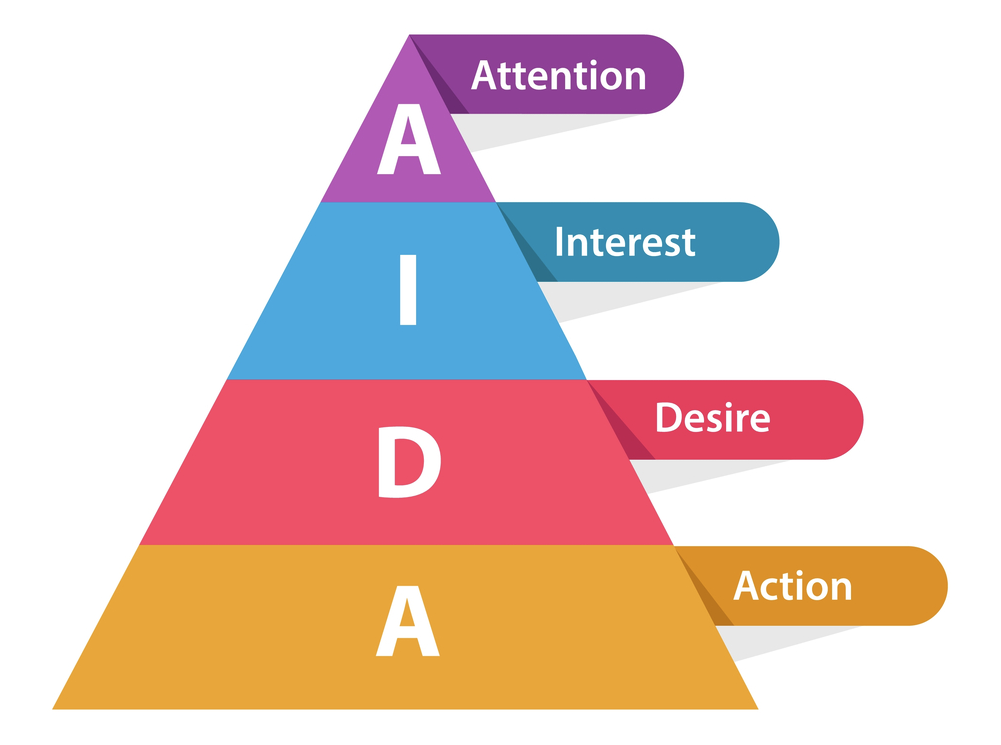
aida model for scripting explainer video

The AIDA Model (Attention, Interest, Desire, Action)

  • Attention: Start with a question or problem.
  • Interest: Introduce your startup’s solution.
  • Desire: Highlight features and benefits.
  • Action: End with a clear call-to-action (CTA).

Writing with Clarity and Brevity

Keep it short and simple (KISS principle). Every second counts. Avoid jargon and focus on user-centric benefits.

3. Design Principles That Make Your Explainer Video Effective

Color Psychology and Brand Identity

Choose a palette that aligns with your brand and evokes the right emotion—blue for trust, green for growth, red for urgency.

Typography and Animation Flow

Fonts must be easy to read, even on mobile. Animations should feel smooth, not distracting. Transitions must guide the viewer’s attention naturally.

4. Voiceover vs. Text-Only: Which Works Best?

Voiceovers add a personal touch and are more engaging, especially when localized for global audiences. However, text-only videos with background music are cost-effective and perfect for social media.

5. How Long Should a Startup Explainer Video Be?

Ideal Duration Based on Platform

  • Website Landing Page: 60–90 seconds
  • Social Media (Instagram, TikTok): 30–60 seconds
  • YouTube Ads: 15–30 seconds

Attention Span Considerations

Shorter is better. The first 10 seconds must hook the viewer. A concise message improves retention and engagement.

6. Real-World Case Studies: Startups That Won Big with Motion Graphics

  • Slack: Their original explainer video clarified what the tool did before it became mainstream.
  • Dropbox: Grew 10M+ users largely thanks to a simple animated explainer on their homepage.
  • Headspace: Uses motion graphics to simplify mental wellness topics for users of all ages.

7. Tools and Software for Creating Motion Graphics Explainer Videos

Adobe After Effects

The industry standard for professional motion graphics. Ideal if you’re hiring a studio or have an in-house designer.

Vyond, Animaker, and Other No-Code Tools

Great for startups with limited budgets. These platforms offer drag-and-drop animation templates and built-in libraries.

8. DIY vs Hiring a Professional Studio

Budget, Time, and Quality Tradeoffs

  • DIY: Cheaper, but can look amateurish.
  • Studio: Costs more ($1,000–$5,000+), but offers scriptwriting, voiceover, animation, and revisions.

If your explainer video is central to your pitch or launch, professional production is a wise investment.

Eggplain is team of experienced animators with a decade of expertise in animated explainer videos, 2D animation, and motion graphics. Since 2015, we have positioned ourselves as one of the world’s top animation production companies, consistently delivering outstanding results.

With a portfolio comprising 400+ videos, we have had the privilege of collaborating with well-known brands you see every day, such as Canva, InBody, Delta Electronics, and United Overseas Bank (UOB).

Book Your Consultation!

No payment or credit card information required.

9. SEO and Marketing Advantages of Video Content

Better Google Rankings

Web pages with videos are 53 times more likely to rank on the first page of Google.

Higher Engagement on Social Media

Motion graphics videos get shared 1200% more than links or text combined. That’s viral startup growth at work.

10. Common Mistakes to Avoid in Startup Explainer Videos

  • Making the video too long
  • Using too much jargon
  • Not having a strong CTA
  • Ignoring mobile optimization
  • Focusing on features, not benefits

FAQs About Motion Graphics Explainer Video for Startups

Q1. What’s the ideal length for a startup explainer video?
A: 60–90 seconds is optimal for most platforms. Keep it concise and engaging.

Q2. How much does it cost to produce one professionally?
A: Costs range from $1,000 to $5,000+ depending on style, length, and studio reputation.

Q3. Are motion graphics videos good for B2B startups?
A: Absolutely. They’re perfect for communicating software benefits or platform features to business clients.

Q4. Can I make one myself without animation experience?
A: Yes, platforms like Animaker and Vyond allow non-designers to create decent motion graphics explainer videos.

Q5. Do these videos improve conversions and sales?
A: Yes. They help users quickly understand your offer, which directly impacts signups and purchases.

Q6. Should I use voiceover or just music and text?
A: Voiceover increases engagement, especially for serious or emotional messaging. Text-only is effective for silent viewing on social media.

Conclusion: The Future of Visual Communication for Startups

A motion graphics explainer video for startups is no longer just a trend—it’s a strategic asset. From simplifying your message to boosting conversions and creating a memorable brand image, this format ticks all the boxes.

Whether you’re launching a product, raising capital, or growing your user base, motion graphics give your startup a voice that stands out—clear, visual, and unforgettable.

Benefits of Using Motion Graphics for Explainer Video in 2025

Benefits of Using Motion Graphics for Explainer Video in 2025

By | Explainer Video | No Comments

Introduction to Motion Graphics and Explainer Videos

What Are Motion Graphics?

Motion graphics are animated graphic design elements. Unlike traditional animation, which focuses on storytelling through characters and scenes, motion graphics animate shapes, text, icons, and other visual elements to convey ideas quickly and clearly. These graphics bring life to otherwise static content and are used across marketing, education, and corporate communication.

The Rise of Explainer Videos in Digital Marketing

Explainer videos are short, informative videos that explain a product, service, or concept in a concise and engaging manner. They have become an essential tool for businesses to:

  • Simplify complex topics.
  • Boost conversions.
  • Improve user understanding.

With attention spans shrinking, motion graphics offer a captivating format for explainer videos that can quickly grab and hold the viewer’s attention.

“Landing pages with explainer videos convert 86 % better compared to those without.”Yansmedia

Why Motion Graphics Work Perfectly for Explainer Videos

The Power of Visual Storytelling

Visuals speak louder than words. Motion graphics blend visuals, sound, and motion to tell compelling stories in under two minutes. They take abstract concepts and turn them into easy-to-understand narratives.

Simplifying Complex Ideas

From blockchain technology to health care procedures, motion graphics can break down even the most complex subjects into digestible chunks. Using icons, charts, and animated diagrams, viewers understand intricate ideas faster and more effectively.

Keeping the Audience Engaged

Animated videos are fun to watch. With the right pacing, voiceover, and design, motion graphics explainer videos maintain viewer interest longer than traditional formats. This results in:

  • Better retention rates.
  • Higher watch times.
  • Increased message clarity.

Motion Graphics vs Live Action vs Whiteboard Animation

StyleProsCons
Motion GraphicsVisually engaging, versatile, affordableMay lack emotional realism
Live ActionRelatable, emotionalExpensive, less flexible
WhiteboardSimple, effective for teachingOutdated visuals, limited appeal

Choose based on your message, audience, and budget.

Real-World Examples of Successful Motion Graphic Explainer Videos

Tech Startups

Motion graphics are fantastic for explaining tech startups because they simplify complex innovations and make them exciting to watch. By combining sleek visuals, animation, and clear narration, motion graphics can break down a startup’s product, mission, and value proposition in under a minute—perfect for pitching to investors or winning over new users. They help turn futuristic ideas into something people instantly “get.”.

Healthcare Industry

Motion graphics are a powerful tool for the healthcare industry because they make complex medical information visually digestible and emotionally engaging. Whether it’s explaining how a new treatment works, visualizing data from health studies, or guiding patients through procedures, motion graphics bring clarity to content that might otherwise feel overwhelming or inaccessible. They help bridge the gap between clinical precision and human understanding—perfect for both professionals and everyday viewers..

Abstract Ideas

Motion graphics are perfect for making abstract ideas feel tangible and understandable. By blending visuals, movement, and sound, they turn complex concepts—like data flow, time travel, or emotional states—into something you can see and feel.

Cost of Producing Motion Graphics for Explainer Videos

Freelancers vs Agencies

  • Freelancers: More affordable but may lack full-service capabilities.
  • Agencies: Offer scriptwriting, design, animation, and voiceover under one roof—at a premium price.

Cost Breakdown by Project Phase

PhaseEstimated Cost
Scriptwriting$100 – $200
Storyboarding$300 – $1000
Animation$600 – $2000+
Voiceover & Music$200 – $300

How to Maximize ROI

  • Focus on one clear message.
  • Distribute the video across multiple platforms.
  • Repurpose content into shorter clips or ads.

Need Motion Graphics Explainer Video for Your Product?

Eggplain is team of experienced animators with a decade of expertise in animated explainer videos, 2D animation, and motion graphics. Since 2015, we have positioned ourselves as one of the world’s top animation production companies, consistently delivering outstanding results.

With a portfolio comprising 400+ videos, we have had the privilege of collaborating with well-known brands you see every day, such as Canva, InBody, Delta Electronics, and United Overseas Bank (UOB).

Book Your Consultation!

No payment or credit card information required.

FAQs about Motion Graphics for Explainer Video

1. How long should a motion graphics explainer video be?
Most are 60–90 seconds long—enough to capture attention and explain key points.

2. Do I need a voiceover for my motion graphics video?
Yes, a voiceover adds clarity and emotion. However, some platforms favor caption-only formats.

3. Can I use motion graphics in ads?
Absolutely! They perform well in social media ads, YouTube pre-rolls, and display networks.

4. What’s the difference between motion graphics and animation?
Motion graphics animate design elements like text and icons, while animation often refers to character-driven storytelling.

5. Are motion graphics suitable for B2B companies?
Yes, they are ideal for explaining complex solutions or products to business decision-makers.

6. How do I measure the success of my explainer video?
Track metrics like watch time, click-through rate, conversion rate, and social shares.

Conclusion: Why Motion Graphics Are a Game-Changer for Explainer Videos

In a world where attention spans are shrinking, motion graphics offer an engaging, effective way to communicate ideas quickly and clearly. Whether you’re a startup launching a new product or a global brand enhancing customer education, motion graphics for explainer video can transform how you connect with your audience.

Investing in this format ensures that your message doesn’t just reach people—it resonates and sticks.

illustrations of business people and growth with headline that compares explainer video and demo video

Explainer Video vs Demo Video (2025 Guide)

By | Explainer Video | No Comments

Introduction to Video Marketing

The Rise of Video in Digital Content

Video marketing is no longer optional, it’s a necessity. With platforms like YouTube, TikTok, and LinkedIn becoming major hubs for visual content, businesses are turning to videos to attract, inform, and convert their audiences. In fact, studies show that video content can boost conversion rates by more than 80% when used effectively.

Why Businesses Rely on Visual Communication

People process visuals 60,000 times faster than text. Whether it’s to showcase a product or explain a complex idea, videos help audiences understand and retain information quickly. That’s why businesses use different types of videos, especially explainer and demo videos, depending on their strategic goals.

What Is an Explainer Video?

Definition and Core Purpose

An explainer video is a short, engaging piece of content that breaks down a product, service, or idea in a clear and compelling way. Its goal is not to show the exact workings of the product but to explain why it matters and how it helps the viewer.

Typical Use Cases for Explainer Videos

  • Startup pitch presentations
  • Landing pages or homepages
  • Social media advertising
  • Email marketing campaigns
  • Product awareness campaigns

Formats and Animation Styles

Explainer videos often use:

  • 2D or 3D animation
  • Whiteboard animation
  • Motion graphics
  • Kinetic typography
  • Live-action + voiceover

73% of marketers created explainer videos in 2025, making explainer one of the top formats

What Is a Demo Video?

Definition and Intent Behind Demo Videos

A demo video, short for “demonstration video,” is designed to showcase how a product works. It gives viewers a clear, step-by-step guide or walkthrough of the product in use, often involving real interfaces, tools, or physical products.

When Are Demo Videos Used?

  • During the sales process (mid to bottom of the funnel)
  • Customer onboarding and training
  • Product feature highlights
  • Tutorials and help center content

Live Action vs Screen Recording Demos

Demo videos can be recorded using:

  • Screen recordings (common for software)
  • Live-action demos (for physical products or SaaS walkthroughs)
  • Hybrid formats that blend visuals and narration

48% of video marketers produce product demo videos

Explainer Video vs Demo Video: Core Differences

Purpose: Educate vs Demonstrate

  • Explainer Video: Simplifies ideas to create interest or awareness.
  • Demo Video: Shows the nitty-gritty, often post-interest, to drive action or retention.

Target Audience Differences

  • Explainer Video: Top-of-funnel prospects who need to understand the “why.”
  • Demo Video: Middle or bottom-of-funnel users ready for the “how.”

Style, Length, and Structure

  • Explainer videos: Short (60–90 seconds), storytelling style, animated.
  • Demo videos: Longer (2–5 minutes), practical and feature-focused, screen-based or real-life recording.
Video TypeAvg. LengthProduction TimeCost Estimate
Explainer60-90 secs4–6 weeks$1,000–$15,000+
Demo2–5 mins2–4 weeks$500–$5,000+

Benefits of Explainer Videos

Simplifies Complex Ideas

Explainer videos turn jargon and confusion into clarity using relatable stories and visuals.

Boosts Brand Awareness

They’re highly shareable and perfect for increasing visibility across platforms like YouTube and Instagram.

Increases Conversion Rates

By emotionally connecting with viewers and illustrating value, explainer videos lead to more sign-ups, leads, or purchases.

Benefits of Demo Videos

Drives Product Adoption

Demo videos help users learn features faster, increasing product usage and satisfaction.

Builds Trust Through Transparency

By showing your product in action, demo videos prove its value in a straightforward manner.

Useful for Onboarding and Training

New customers and employees benefit greatly from guided, visual walkthroughs.

Which One Should You Choose?

illustration of a person making business decision on a fork of the road

Choosing Based on Marketing Funnel Stages

  • Top-of-Funnel (Awareness): Go with explainer videos.
  • Middle to Bottom-of-Funnel (Consideration/Decision): Opt for demo videos.

Product Complexity and Buyer Readiness

If your product is new or innovative, an explainer builds foundational knowledge. If it’s already known but complex to use, a demo will guide users effectively.

Combining Explainer and Demo Videos

Many brands benefit from using both:

  • Use explainer videos in ads or homepage.
  • Embed demo videos in product pages or onboarding flows.

Need Explainer Video or Demo Video for Your Product?

Eggplain is team of experienced animators with a decade of expertise in animated explainer videos, 2D animation, and motion graphics. Since 2015, we have positioned ourselves as one of the world’s top animation production companies, consistently delivering outstanding results.

With a portfolio comprising 400+ videos, we have had the privilege of collaborating with well-known brands you see every day, such as Canva, InBody, Delta Electronics, and United Overseas Bank (UOB).

Book Your Consultation!

No payment or credit card information required.

FAQs

1. What is the main difference between an explainer and a demo video?
Explainers educate or simplify a concept, while demo videos show how a product works in detail.

2. Can I use both video types in one marketing campaign?
Yes! They serve different purposes and complement each other perfectly across the funnel.

3. How long should each video be?
Explainer videos should be around 60–90 seconds. Demo videos can be 2–5 minutes depending on depth.

4. Are demo videos only for software?
No, they’re used for physical products too, especially in e-commerce and tech industries.

5. Do explainer videos help with SEO?
Absolutely. They improve dwell time and increase engagement, helping your page rank better.

6. How do I know which type my audience needs?
Assess your funnel stage. Use explainers for early awareness, and demos for converting interest into action.

Conclusion: Explainer Video vs Demo Video

Understanding the difference between an explainer video vs demo video is essential for modern marketing. Explainers captivate and clarify, while demos instruct and convert. Both are powerful tools, but their effectiveness depends on how and when you use them. Want to maximize ROI? Use both strategically across your marketing funnel.

which platform is best for explainer videos

Which Platform Is Best for Explainer Videos Distribution?

By | Explainer Video | No Comments

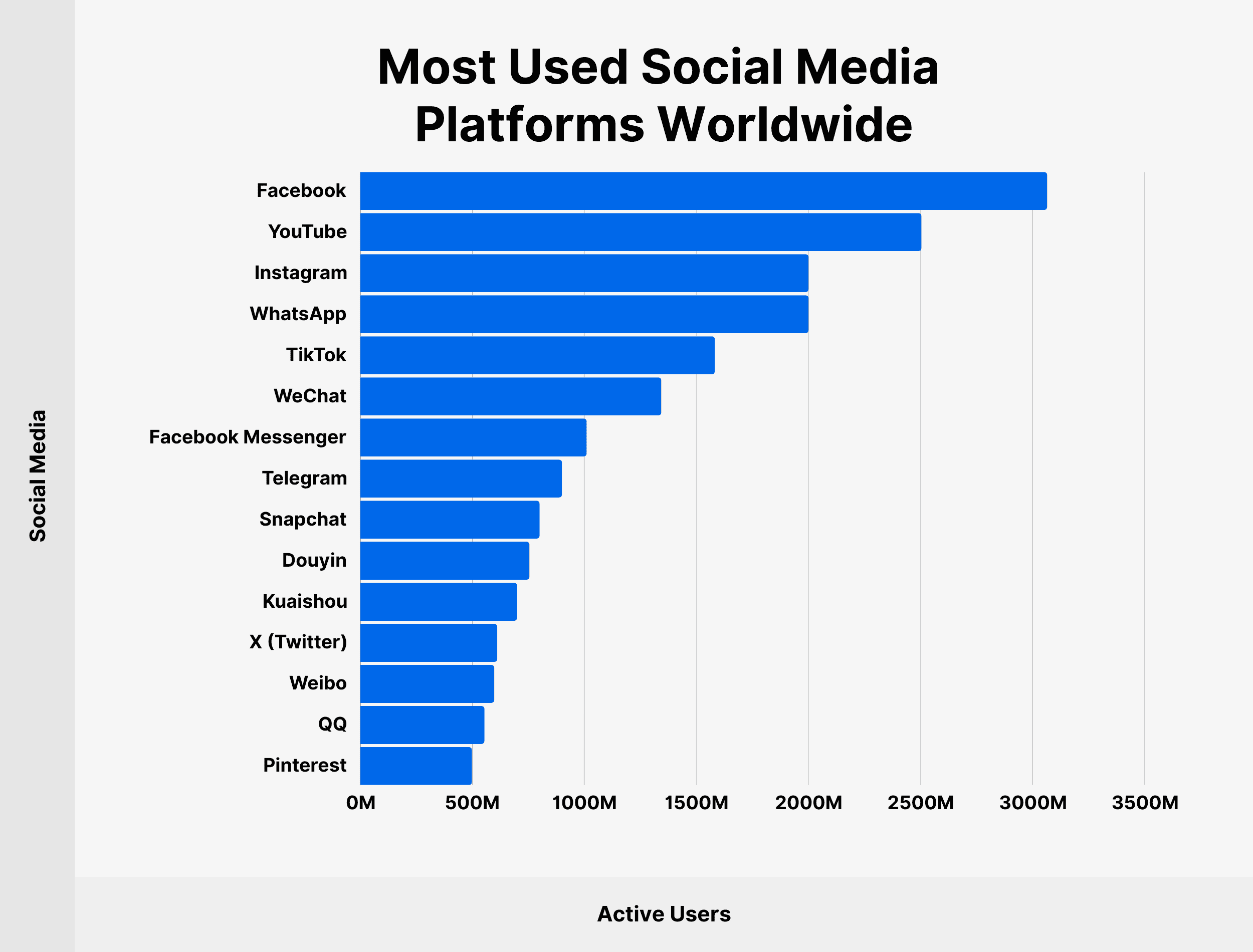
Explainer videos are one of the most effective tools for grabbing attention, educating audiences, and driving conversions. But even the best video won’t perform well if it’s not shared on the right platform. Choosing where to upload your explainer videos can make or break their impact. Here’s a breakdown of the best social media platforms for your explainer videos, what makes each one valuable, and how to get the most out of them.

1. YouTube

“Daily active users: approximately 122 millions.”

Why it’s great:
YouTube is the king of video content. With over 2 billion monthly logged-in users, it’s the go-to platform for long-form and educational content. It’s also owned by Google, meaning your explainer videos can show up in search results, giving them a longer shelf life.

Best for:

  • Product or service demos
  • Tutorials
  • SEO-driven traffic

Tips:

  • Optimize your titles, descriptions, and tags with relevant keywords.
  • Create custom thumbnails to increase click-through rates.
  • Add chapters or timestamps for longer videos.

2. Instagram

“Reels Engagement Rate: 1.23%, higher than photos (0.70%) and carousels (0.99%).”

Why it’s great:
Instagram is all about short-form visual content. It supports multiple video formats—Stories, Reels, and IGTV—making it perfect for bite-sized explainer videos.

Best for:

  • Quick how-tos
  • Teasers or highlights of longer explainer videos
  • Visually appealing content for mobile users

Tips:

  • Keep Reels under 60 seconds for best engagement.
  • Use subtitles; most viewers watch without sound.
  • Post consistently and use relevant hashtags.

3. Facebook

Why it’s great:
Despite newer platforms gaining attention, Facebook still boasts nearly 3 billion users. Its video player is built for autoplay, which boosts views. Plus, Facebook’s ad tools make it easy to promote explainer videos to a targeted audience.

Best for:

  • B2C product videos
  • Brand awareness campaigns
  • Explainer videos tied to promotions or offers

Tips:

  • Upload videos directly to Facebook (don’t just share a YouTube link).
  • Include captions to maximize reach.
  • Engage with comments to increase organic reach.

4. LinkedIn

Why it’s great:
If you’re targeting professionals, B2B decision-makers, or industry experts, LinkedIn is your arena. Explainer videos that solve business problems or showcase software features work especially well here.

Best for:

  • SaaS and tech products
  • Thought leadership content
  • Company culture or onboarding videos

Tips:

  • Keep videos under 2 minutes.
  • Use clean, professional visuals.
  • Add a strong hook in the first 5 seconds.

Users are 20 times more likely to share video content.

5. TikTok

Why it’s great:
TikTok isn’t just for dance trends and memes anymore. It’s now a massive discovery platform, especially among Gen Z and Millennials. Its short, algorithm-driven content gives explainer videos a real chance to go viral.

Best for:

  • Quick product demonstrations
  • Entertaining or quirky explainer formats
  • Consumer-facing brands with a casual tone

Tips:

  • Keep it short and punchy (under 60 seconds).
  • Use trending audio and hashtags.
  • Focus on storytelling and authenticity.

Choosing the Right Platform: Key Factors

Not every platform will work for every business. Ask yourself:

  • Who is your target audience?
  • What’s the length and style of your explainer video?
  • Do you want reach, engagement, SEO, or conversions?

It’s often smart to tailor your explainer video for multiple platforms. Repurpose content in different lengths or formats to maximize reach and effectiveness.

Want to Explainer Video for Your Brand?

Eggplain is team of experienced animators with a decade of expertise in animated explainer videos, 2D animation, and motion graphics. Since 2015, we have positioned ourselves as one of the world’s top animation production companies, consistently delivering outstanding results.

With a portfolio comprising 400+ videos, we have had the privilege of collaborating with well-known brands you see every day, such as Canva, InBody, Delta Electronics, and United Overseas Bank (UOB).

Book Your Consultation!

No payment or credit card information required.

FAQ: Explainer Video Distribution on Social Media

Q: What’s the best platform overall to upload explainer videos?
A: YouTube is the best all-around platform for visibility, SEO, and longevity. But if you’re aiming for quick engagement or targeting a specific audience, Instagram, TikTok, or LinkedIn might serve better.

Q: How long should my explainer video be for social media?
A: Aim for 60–90 seconds. On platforms like TikTok or Instagram Reels, even 15–30 seconds can be powerful. For YouTube or LinkedIn, you can go up to 2–3 minutes if the content justifies it.

Q: Should I use subtitles?
A: Yes. Many users watch without sound, especially on mobile. Subtitles improve accessibility and engagement.

Q: Can I post the same video on every platform?
A: You can, but it’s better to customize. A square or vertical format performs better on Instagram and TikTok, while horizontal is ideal for YouTube and LinkedIn.

Q: What video format works best across social platforms?
A: MP4 is the most widely accepted format. Stick to high-resolution (at least 1080p) and ensure mobile optimization.

Q: Should I run ads for my explainer videos?
A: If you have budget, yes. Platforms like Facebook, Instagram, LinkedIn, and TikTok offer precise targeting. Ads can significantly increase your reach and conversion rate.

Final Thoughts

Explainer videos are only as powerful as the platforms you use to share them. Each social media channel has its strengths, and the best strategy often involves a combination of platforms tailored to your audience and goals. Repurpose smartly, optimize for mobile, and use analytics to double down on what works.

If your explainer video is great, the right platform will make sure the right people see it—and take action.

A dynamic SaaS explainer video marketing showcasing the latest trends for 2024

8 Game-Changing SaaS Video Marketing Trends for 2024

By | Explainer Video | No Comments

Software-as-a-Service (SaaS) companies increasingly rely on explainer videos to simplify their value proposition and attract potential customers. These videos effectively communicate complex concepts, engage viewers, and convert leads into customers. However, as more businesses adopt Saas video marketing in 2024, staying ahead of the competition requires leveraging the latest trends in SaaS explainer videos.

From animation styles to personalized messaging, SaaS video marketing are evolving rapidly. This article explores the latest trends shaping this dynamic marketing tool and how companies can adapt to stay relevant in a competitive marketplace.

Why SaaS Explainer Videos Are Essential for Marketing

SaaS products often deal with complex functionalities, and explaining these to a broad audience is challenging. Explainer videos offer a clear, concise, and engaging way to showcase the product’s features and benefits. Instead of lengthy text descriptions, businesses can use visuals to simplify their message and connect emotionally with their audience.

Recent studies show that over 80% of consumers are more likely to buy a product after watching a video about it. SaaS companies that integrate explainer videos into their marketing strategy typically see improved conversion rates, better customer understanding, and reduced churn.

“80% of consumers are more likely to buy after watching a video”

1. Personalized SaaS Explainer Videos: Tailoring Content to Your Audience

In 2024, personalization continues to be a dominant trend in SaaS explainer videos. As the demand for relevant and engaging content grows, SaaS companies are increasingly adopting personalized explainer videos to resonate more deeply with their target audience. These videos use data-driven insights to customize the content based on the viewer’s preferences, behavior, or demographics.

For example, explainer videos can be tailored to different segments of a SaaS company’s user base, offering personalized solutions to individual needs. A prospective customer might see an explainer video that focuses on how the SaaS product solves their specific pain points, while an existing customer could view a video that highlights new features.

This level of personalization increases viewer engagement and boosts the likelihood of conversion. When the content feels directly relevant, viewers are more likely to respond positively and take action.

2. Animation Styles Evolving for Maximum Impact

SaaS explainer videos have always been known for their creative use of animation to explain abstract concepts in a visually engaging manner. Recently, there has been a shift towards more sophisticated and diverse animation styles.

2D and 3D Animation Hybrids

One emerging trend is the blending of 2D and 3D animation. This approach allows companies to highlight the best of both worlds—2D animation’s simplicity and clarity with the depth and realism of 3D. The result is a visually striking and memorable video that can effectively explain even the most complex aspects of a SaaS product.

Motion Graphics and Kinetic Typography

Motion graphics have been a staple of explainer videos, but they are evolving in 2024 to include more kinetic typography—moving text that creates a dynamic experience. When paired with sound design and engaging visuals, kinetic typography can emphasize critical points, making the message clearer and more impactful.

3. Micro-Explainer Videos for Bite-Sized Information

As attention spans continue to shrink, micro-explainer videos—short, focused videos lasting less than 30 seconds—are becoming a key trend. These videos are perfect for SaaS companies looking to convey a specific message or feature quickly. They can be used across social media platforms, landing pages, or even in email campaigns to maintain audience attention without overwhelming them with too much information.

The goal of micro-explainer videos is to capture interest quickly and encourage further exploration. Many companies use these short videos as part of a larger marketing funnel, guiding potential customers to more detailed content or a product demo.

4. Incorporating AI and Data Analytics into SaaS Video Marketing in 2024

Artificial Intelligence (AI) is now playing a significant role in shaping how SaaS explainer videos are produced and delivered. AI-driven video tools can automate video creation, enabling companies to produce personalized and scalable explainer videos at a lower cost.

AI also helps in video optimization. With advanced data analytics, SaaS companies can measure viewer behavior, such as how much of the video was watched, which parts were rewatched, and what actions were taken after viewing. This information allows marketers to refine their videos for better engagement and conversion.

Predictive analytics also comes into play, with AI forecasting the type of content that would resonate best with different audience segments. SaaS companies can then create explainer videos tailored to these insights, improving their overall marketing efficiency.

5. The Shift Towards Storytelling in SaaS Explainer Videos

Storytelling is another trend gaining momentum in SaaS explainer videos. Rather than just focusing on the technical aspects of the product, companies are increasingly telling a story that highlights how the product solves real-world problems. This approach makes the video more relatable and helps build an emotional connection with viewers.

A compelling narrative engages viewers on a deeper level, making the content not only informative but also memorable. By humanizing their message, SaaS companies can create more meaningful relationships with potential customers, improving brand loyalty and trust.

6. SaaS Video Marketing 2024 Optimized for Mobile Viewing

With more consumers watching videos on their mobile devices, optimizing SaaS explainer videos for mobile has become a necessity. In 2024, mobile-friendly video formats are a must for reaching a broader audience.

Mobile-optimized explainer videos typically feature shorter lengths, larger text, and vertical formats, ensuring they are easy to view on smartphones. By creating videos specifically designed for mobile users, SaaS companies can enhance the user experience and increase the likelihood of engagement and conversion.

7. Voiceover Trends: Conversational and Natural Tones

The tone of voice in SaaS explainer videos is shifting away from formal and corporate toward more conversational and approachable styles. Audiences respond better to voices that feel natural and relatable, and SaaS companies are embracing this trend.

Instead of technical jargon, explainer videos now feature casual language and real-life scenarios, making the content more accessible. A friendly, conversational voiceover creates a sense of trust and helps viewers feel more comfortable with the product.

8. Hiring Professional Saas Explainer Video Company

If you want to ensure your Saas explainer video is of the highest quality, consider hiring professional animators. Experienced professionals can bring your vision to life, helping you achieve the perfect balance between creativity and clarity.

When deciding whether to outsource video creation or handle it in-house, consider your resources. Outsourcing can give you access to skilled animators and save time, while creating videos in-house allows for more control and potentially lower costs if you have the right talent on hand.

Eggplain is team of experienced animators with nearly a decade of expertise in collage animations, animated explainer videos, 2D, 3D, and motion graphics. Since 2015, we have positioned ourselves as one of the world’s top animation production companies, consistently delivering outstanding results.

With a portfolio comprising 400+ videos, we have had the privilege of collaborating with well-known brands you you see every day, such as Canva, InBody, Ridgid, Delta Electronics, and United Overseas Bank (UOB).

FAQs

What makes a SaaS explainer video effective?
A successful SaaS explainer video clearly explains a product’s value proposition in a concise and engaging manner. It should be visually appealing, tailored to the target audience, and end with a compelling call to action.

How long should a SaaS video marketing in 2024 be?
Ideally, a SaaS explainer video should last between 60 to 90 seconds. This length is sufficient to deliver key information while maintaining viewer interest. However, micro-explainer videos lasting under 30 seconds are becoming popular for quick messaging.

How can storytelling improve SaaS explainer videos?
Storytelling adds a human element to SaaS explainer videos, making the content more relatable. By focusing on how the product solves real-world problems, storytelling builds an emotional connection with the viewer, leading to better engagement.

Why is mobile optimization important for SaaS video marketing in 2024?
With more people watching videos on mobile devices, optimizing explainer videos for mobile ensures a seamless viewing experience. Mobile-friendly videos have shorter lengths, larger text, and are often formatted vertically.

Conclusion

The landscape of SaaS explainer videos is constantly evolving, driven by trends such as personalization, interactivity, and AI integration. As SaaS companies look to stand out in an increasingly competitive market, embracing these innovations can help them create more engaging and effective videos. Whether through dynamic animation styles, mobile optimization, or personalized content, the latest trends in SaaS explainer videos are shaping the future of digital marketing.

Schedule Your Free Consultation!

No payment or credit card information required.