Motion graphics explainer videos have become one of the most powerful tools for businesses, educators, and content creators. They combine animation, text, and sound to communicate complex ideas in a simple and engaging way. In today’s fast-paced digital world, audiences prefer short, visually rich videos that get to the point quickly—and that’s exactly where motion graphics shine.
“91% of businesses use video as a marketing tool.”
Wyzowl
Motion graphics explainer videos use animated visuals to break down a product, service, or concept. Unlike traditional videos with actors or static presentations, motion graphics rely on animated text, shapes, and icons to illustrate ideas. They’re clean, modern, and visually appealing—making them perfect for explaining tech products, educational content, and marketing campaigns.
Brands use these videos because they make information digestible, entertaining, and memorable. Whether it’s a product demo or a company introduction, motion graphics help audiences quickly understand what’s being offered. Moreover, they enhance brand identity through consistent colors, typography, and motion style.
Motion graphics videos grab attention instantly. Their vibrant visuals and dynamic motion keep viewers watching longer, improving engagement rates and brand recall.
A key advantage is simplification. By turning complex topics into visual metaphors, you help audiences grasp information faster—especially useful in industries like tech, healthcare, or finance.
Storytelling through motion graphics connects emotionally with viewers. A well-structured explainer video can increase conversion rates by 20–30%, as it guides the viewer through a clear and persuasive message.
Get a personalized estimate now and start creating explainer videos that drive engagement and sales.
Every great video starts with a clear purpose. Are you trying to educate, sell, or inspire? Define your goal and identify who your target audience is—their age, interests, and pain points.
A motion graphics explainer video is only as strong as its script. Keep it short (60–90 seconds), conversational, and focused on the problem, the solution, and the call-to-action (CTA).
Before animating, sketch out the scenes. A storyboard helps map the sequence of visuals, text, and narration, ensuring smooth transitions and logical flow.
Colors and fonts convey mood and personality. Stick to 2–3 brand colors and use readable fonts that align with your brand identity.
Custom icons or characters make your video unique. Use shapes and simple designs for clarity—avoid clutter that distracts from the message.
Maintain visual consistency with your brand’s logo, colors, and typography to strengthen recognition.
Mastering keyframes is essential. Smooth acceleration, deceleration, and easing effects make animations look professional rather than robotic.
Perfect timing creates flow. Sync movement to voiceovers and maintain a rhythm that feels natural.
Good sound design enhances storytelling. Ensure that each motion or scene change matches the beats or cues in the audio track.
If you’re new to animation, tools like Canva, Animaker, and Vyond offer drag-and-drop templates for quick results.
For advanced designers, Adobe After Effects remains the gold standard. Blender and Cinema 4D are also powerful for 3D motion graphics.
Use software like Audacity, Adobe Audition, or GarageBand to record, clean, and enhance your audio.
Now that your storyboard, visuals, and assets are ready, it’s time to bring your project to life. Production is where all the pieces — script, animation, and sound — come together seamlessly.
A high-quality voiceover is the backbone of any good explainer video. Choose a tone that fits your brand — friendly, professional, or conversational. You can record voiceovers using tools like Audacity or Adobe Audition with a good-quality microphone.
For background music, opt for royalty-free tracks that complement the mood of your video. Avoid overpowering music; it should support the visuals, not dominate them. Sites like Epidemic Sound, Artlist, or Free Music Archive offer a range of tracks perfect for explainer videos.
Editing is where the magic happens. Combine your animations, transitions, and audio to create a cohesive flow. Fine-tune the pacing — not too slow, not too fast. Review the video multiple times to ensure every frame aligns with the narration.
Don’t forget to add subtitles for accessibility. Subtitles not only make your video more inclusive but also improve engagement on social platforms where videos autoplay without sound.
Once your edit is complete, export the video in the correct format. The most common format for web use is MP4 (H.264). Choose a resolution of 1080p or 4K for high-quality visuals. Keep file size optimized for faster loading without losing clarity.
Even the most well-made video won’t make an impact if no one sees it. Promotion is the key to ensuring your motion graphics explainer video reaches the right audience.
Start by uploading your video on YouTube, the second-largest search engine in the world. Optimize the title, description, and tags with your keyword — for example, “how to make a motion graphics explainer video”.
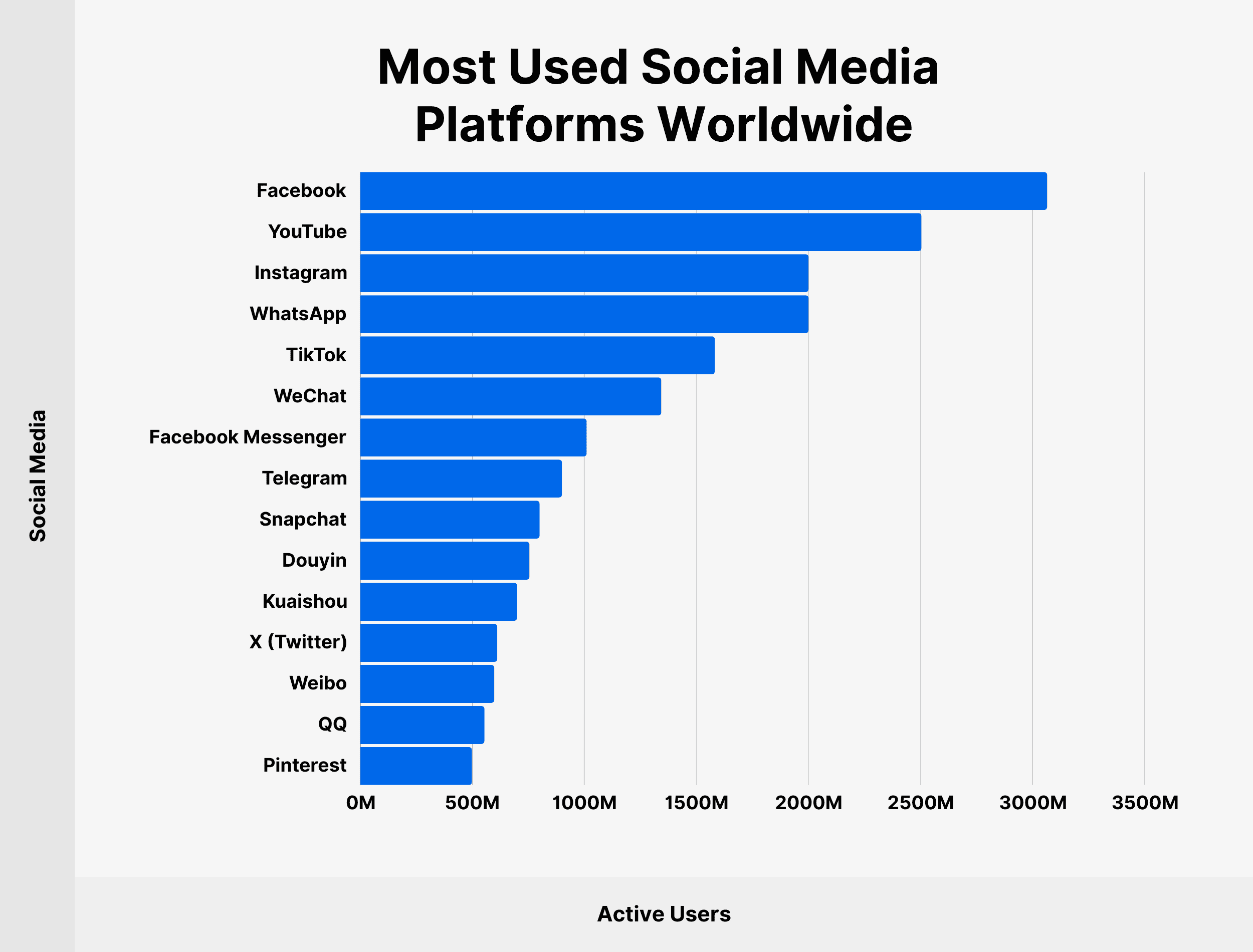
Share snippets or teaser clips on Instagram, LinkedIn, TikTok, and Facebook to attract attention and drive traffic back to the full video.
Adding your video to your website or landing page can increase conversion rates significantly. Studies show that including an explainer video can boost conversions by up to 80%. Use autoplay or a thumbnail that invites users to click play.
Track your video’s success using analytics tools. Measure views, watch time, click-through rates, and engagement metrics. Platforms like YouTube Analytics and Google Analytics offer insights into how well your video performs and where improvements are needed.
Optimize your video file name, title, and metadata using keywords. Provide captions and transcripts for accessibility. Hosting your video on YouTube and embedding it on your website increases visibility and ranking potential.
“Landing pages with videos increase conversions by up to 86%.”
VWO
Creating your own explainer video can be a fun and rewarding challenge, but sometimes, hiring a professional studio or motion designer is the smarter choice — especially if you want a high-quality, brand-aligned, and conversion-focused video.
Professional motion graphics artists bring a combination of creative vision, technical skill, and storytelling expertise that’s difficult to replicate without experience. Let’s explore the reasons why investing in professional help can pay off in the long run.
You should consider hiring a professional when:
For startups or small businesses with limited budgets, starting with DIY tools makes sense. But as your brand grows, upgrading to professional-grade motion graphics can dramatically improve your visual storytelling and marketing results.
Get a personalized estimate now and start creating explainer videos that drive engagement and sales.
1. What is the ideal length for a motion graphics explainer video?
The best-performing explainer videos are between 60 and 90 seconds long. This duration keeps the viewer’s attention while delivering your key message effectively.
2. Do I need professional software to make an explainer video?
Not necessarily. Beginners can use tools like Canva, Animaker, or Powtoon. Professionals often prefer Adobe After Effects for greater creative control.
3. How long does it take to create a motion graphics explainer video?
Depending on complexity, it can take anywhere from 3 days to 3 weeks — including scripting, designing, animating, and editing.
4. Can I make an explainer video without voiceovers?
Yes, but it’s not ideal. Voiceovers enhance storytelling and make the message clearer. If you skip it, use strong visuals and on-screen text instead.
5. How much does it cost to make a motion graphics explainer video?
DIY videos can cost as little as $50-$200 (using templates), while professional productions can range from $500 to $2,500+, depending on quality and length.
6. What’s the difference between motion graphics and animation?
Motion graphics focus on moving shapes and text to convey ideas, while animation often involves character movement and storytelling. Motion graphics are typically used for informative and marketing content.
Learning how to make a motion graphics explainer video opens doors to creative storytelling and brand communication. Whether you’re a small business owner, educator, or digital marketer, these videos can turn complex ideas into engaging stories that inspire action.
By combining compelling scripts, clean design, smooth animation, and strong sound design, you can craft an explainer video that resonates with your audience — driving both engagement and conversions.
So, start small, experiment, and keep refining your style. Every frame you animate brings your story one step closer to life!
In today’s fast-moving digital world, businesses must grab attention quickly, or risk being ignored. That’s…
What Is a Motion Graphics Explainer Video? Definition and Purpose A motion graphics explainer video…
Motion Graphics Explainer Video for Business A motion graphics explainer video for business is one…
What is a SaaS Motion Graphics Explainer Video? Defining SaaS Explainer Videos A SaaS motion…
Why Startups Need to Stand Out In today’s ultra-competitive startup world, you only have a…
Introduction to Motion Graphics and Explainer Videos What Are Motion Graphics? Motion graphics are animated…